
ChatGPT and Claude
You can hand a meeting transcript to ChatGPT or Claude straight from the recording page. The assistant opens in a new tab with a ready prompt and your transcript.
Send a transcript to ChatGPT or Claude
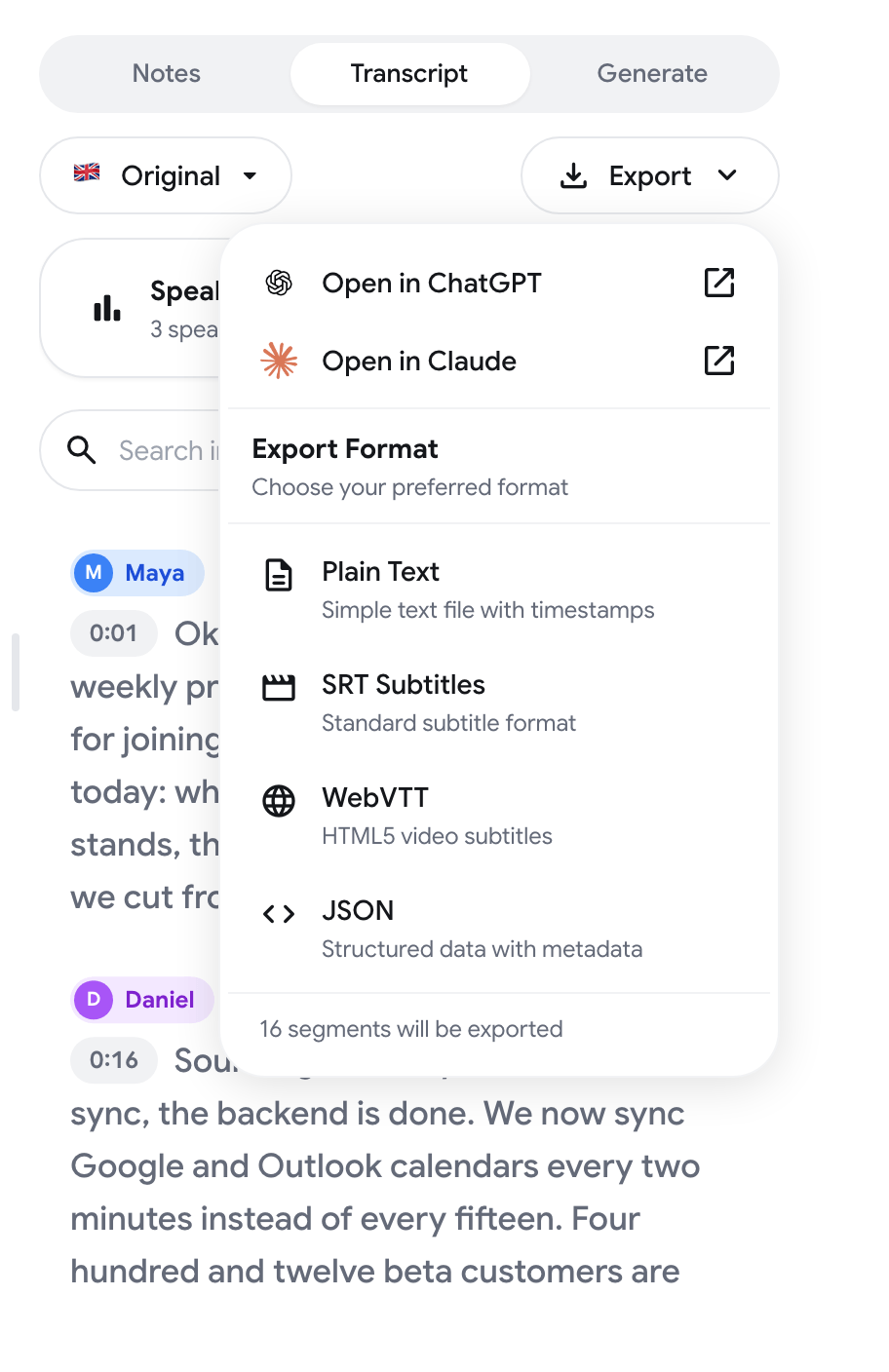
Section titled “Send a transcript to ChatGPT or Claude”- Open a recording at recordmeeting.com/app and go to the Transcript tab.
- Click Export.
- Choose Open in ChatGPT or Open in Claude.
A new tab opens at chatgpt.com or claude.ai with the message already filled in. You need your own ChatGPT or Claude account, signed in in the same browser.
The transcript has to exist first. Transcription is part of the paid plans. See Transcription.
What is sent
Section titled “What is sent”The message contains two things:
- A prompt. It names the meeting by its title and date and asks the assistant to summarize it, list the decisions and the action items with their owners, and then help with follow-up questions.
- The transcript. Plain text with the speaker names, without timestamps.
Nothing else from your account is sent: no video, no audio, no notes and no other recordings. The text goes from your browser to the assistant you chose, and that provider handles it under its own terms.
Long transcripts
Section titled “Long transcripts”A short transcript travels inside the link, so the message is complete when the tab opens. The limit is about 30,000 characters for ChatGPT and about 14,000 characters for Claude, counting the prompt and the transcript together.
A longer transcript does not fit in a link. In that case:
- Record Meeting copies the transcript to your clipboard and shows “Transcript copied”.
- The assistant opens with the prompt and a line that asks you to paste.
- Press Ctrl+V (⌘V on a Mac) in the message box to paste the transcript.
If your browser blocks copying, the app tells you so. Export the transcript as Plain Text from the same menu and attach the file in ChatGPT or Claude instead.
Connect an assistant to all your recordings
Section titled “Connect an assistant to all your recordings”Open in ChatGPT and Open in Claude send one transcript, once. If you want an assistant that can look through all your meetings, find a recording by date, read its transcript and notes and answer questions across them, connect it through the Record Meeting MCP server. It works with Claude, ChatGPT, Cursor and other MCP clients.
See MCP Server for the setup.